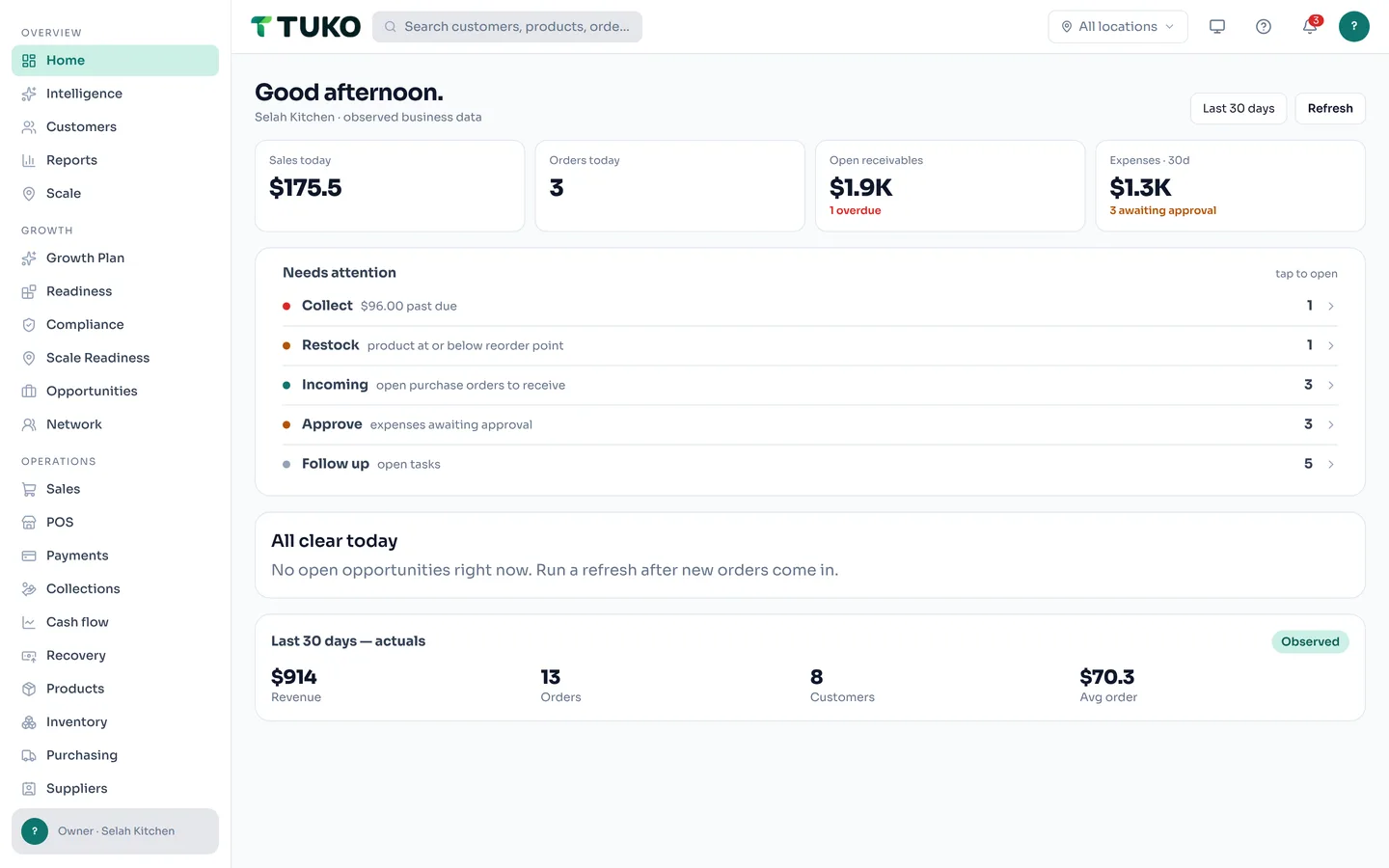


The same workspace on a phone — brief, register, and photo-verified clock-ins. Real shots from the demo workspace.
The quiet leaks
Your P&L is a surprise. Your stockroom is a rumor.
Your best customer left three weeks ago — and nobody noticed.
Most business software records what already happened and leaves the worrying to you. If you can't answer these in five seconds, your business is running you.
Who owes you money right now — and how late are they?
TUKO already knows
Receivables aging surfaces on your brief before it becomes a write-off — with the invoice, the amount, and the customer attached.
What sells out tomorrow that you're about to run out of?
TUKO already knows
Low-stock and stockout-risk signals are ranked by how fast items actually move — not by whoever checked the shelf last.
Which customer quietly stopped buying from you?
TUKO already knows
At-risk and win-back signals flag fading customers while there's still time — their full history one tap away.
Dashboards show you charts. TUKO tells you what to do.
One sale updates everything.
Record the business once — TUKO keeps the rest in sync, then ranks what needs attention next.
Ring it up
A counter sale or sales order records the customer, the items, and the payment in one entry — even when the signal drops.
Stock moves itself
The same ledger deducts what sold. No second system to update, no end-of-day reconciliation.
The engine watches
Business Pulse scans your real numbers across 30 signal types and ranks what needs attention — evidence attached.
You take the next step
Tomorrow's brief opens the record behind each item: collect the invoice, raise the purchase order, follow up the customer.
Everything runs in one system. Every morning, it tells you what to do next.
Sales, stock, money, and people — recorded once, watched always. No dashboards to babysit, no numbers re-entered in five places.
Daily brief
Every morning, TUKO surfaces what needs attention — overdue invoices, low stock, fading customers — ranked by impact, with the action attached.
Business Pulse
30 signal types scan your real data and rank what needs attention — evidence and a next action on every signal. How it works.
Cash Flow Foresight
A day-by-day cash projection from your real orders, expenses, purchase orders, and payroll — warned before you run short. How it works.
Revenue Recovery
Overdue payments, stalled quotes, and customers due to buy again — one ranked list with reasons and follow-ups. How it works.
Orders & inventory
Quotes, sales orders, stock levels, and purchase orders that stay in sync — automatically. How purchasing works.
Payments & receivables
Record payments, track receivables, and see exactly who owes you what — aging included.
Point of sale
A tablet register for the counter — tap products, take cash, card, wallet, or split payments, keep selling offline. How it works.
Customers & suppliers
A clean directory with order history, balances, and context — no CRM bloat.
Customer 360
A living profile for every customer — health score, lifetime stats, and a full timeline — so a fading regular never goes unnoticed. How it works.
Opportunities
Revenue signals detected from your real data — repeat buyers to call, slow-moving stock to clear, margin leaks to plug.
Reports
Sales, expenses, and profitability at a glance. Export to CSV when you need it.
People & HR
Employee profiles, roles, schedules, and lifecycle history — the same rigor as your books.
Time, attendance & leave
Photo-verified clock-ins with server-stamped times, corrections, and leave requests your team files and you approve.
Payroll
Pay runs, statutory rules, disbursements, and payslips — country-aware, review-gated, and audited.
Locations & franchise
Every branch gets its own dashboard and scoped staff access — and blueprints turn a proven location into a repeatable playbook. How Scale works · Franchise management.
Built for businesses that keep inventory.
Pick the business you actually run — the workflow already fits.
Stock that sells out before you notice
Reorder signals, dead-stock flags, and a register that keeps selling when the signal drops.
TUKO for retail → Wholesale & distributionCredit sales without the notebook
Receivables aging, warehouse stock, and supplier purchase orders in one ledger — who owes what, always current.
TUKO for wholesale → Food businessesWhat sold, what to restock, what earns
Daily sales and margin by item — restock the movers, stop feeding the shelf-warmers.
TUKO for food → E-commerce sellersStorefront and stock, kept in sync
Orders, products, and customers flow in from your shop — one ledger behind every channel.
TUKO for e-commerce → Growing & multi-locationEvery branch, its own dashboard
Staff scoped to their site while owners see it all — blueprints turn one good branch into the playbook for the next.
TUKO Scale → Philippine businessesBuilt for how PH businesses run
PH payroll rules, 13th month, utang-friendly receivables, and timekeeping that fits the shop floor.
TUKO Philippines →From signup to your first next move — today.
No implementation project, no consultant. Four steps.
Create your workspace
Free to start, no credit card. Works on web, iOS, and Android — one account, same data.
Bring your numbers
Import customers, products, and orders from CSV in minutes — or load the demo dataset and look around first.
Open the brief
TUKO scans your real data and ranks what needs attention — the money owed to you, the stock about to run out.
Act in place
Each move opens the record behind it: collect, reorder, assign, follow up. Finished moves clear themselves.
TUKO Results
Know what changed. Not just what happened.
Every TUKO plan runs the same loop: your records feed the signals, you approve the actions, and the results line reports what the evidence confirms — never activity dressed up as a result.
Signals with evidence
Detectors flag what's off — overdue money, stock risk, stalled quotes — and every signal carries the numbers behind it.
Actions you approve
TUKO recommends; you decide. Every action is recorded in an audit trail — what was suggested, what you did, when.
Results you can check
Revenue Recovery reports "paid after follow-up" — temporal evidence, not a causation claim. Estimates stay labeled est., never blended into real numbers.
Your business, under your control.
Quiet by design — the controls below are product behavior, not a policy page.
Staff see what they should
Roles and permissions scope people to their location and their job — owners keep approvals and admin actions.
Every change on the record
Approvals, payments, and admin actions write to an append-only audit log — who did what, and when, is never a guess.
Your data is exportable
Customers, products, orders, and reports export cleanly — no lock-in, no hostage data.
Private files stay private
Photos and documents live in org-scoped private storage, shared through short-lived links — never public URLs.
No trackers on this site
tukohq.com runs zero third-party tracking cookies — product analytics stay first-party, inside your workspace.
Honest about AI
Priority ranking is deterministic by default. The optional model sees minimized numbers only — off by default, never your names or notes.
Put TUKO in your pocket — and on your counter.
TUKO: Business Manager & POS — the register, the records, and your ranked daily brief, rebuilt for your phone. Sell at the counter even when the signal drops. See the app → Running a till on a PC or a Mac? TUKO for Windows & Mac keeps the register and the attendance kiosk working offline.
One account, same data — start on the web now, the apps pick up right where you left off.
Free to run your business on.
TUKO Core is the complete operational system — no subscription, no seat or location fees. Two optional extras when you need them: TUKO Intelligence (coming later) and Enterprise contracts.
TUKO Core
The complete core business system — free, no credit card.
- Customers, sales, inventory & payments
- HR, attendance, leave & payroll
- Multi-location, POS & Business Pulse
TUKO Intelligence
Optional advanced intelligence — forecasting, scenario planning, and advanced analytics.
- Advanced forecasting
- Scenario planning
- Advanced analytics
TUKO Enterprise
For organizations that need SSO, governance, and contractual support.
- SSO & advanced governance / audit
- Contractual SLAs & dedicated support
- Custom integrations & implementation
Every TUKO workspace includes TUKO Results — goals, approved actions, and outcomes verified against your own records · No per-seat, per-location, or per-record charges · See everything included →
Frequently asked questions
Straight answers about what TUKO is and who it's for.
What is TUKO?
TUKO is the command system for small business. Sales, customers, inventory, payments, expenses, HR, and payroll run in one workspace — and every morning TUKO hands you a ranked brief of what to do next, with the evidence and the action attached.
What does "know what to do next" actually mean?
Every morning, TUKO's deterministic engine scans your real numbers — orders, payments, stock, expenses, attendance — across 30 signal types and produces a short ranked brief: the overdue invoice to collect, the stock to reorder, the customer to win back. Each item shows the evidence and a one-tap action. No dashboards to interpret, no reports to build.
Who is TUKO for?
Owners and teams who are done being the integration layer between spreadsheets, chat threads, and five disconnected apps. If you sell products or services and employ people, TUKO runs your operations — and tells you where to look first.
Is TUKO an ERP?
TUKO covers what an ERP does — orders, inventory, purchasing, payments, expenses, HR, and payroll — but it is built around a different idea. ERPs give you dashboards to interpret. TUKO runs a deterministic engine over your real data and hands you a ranked brief of what to do next, evidence included. If you want the coverage without the babysitting, that's TUKO.
Can TUKO replace my spreadsheets and other apps?
Yes — that is the point. Orders, stock, customer balances, attendance, and payroll live in one system, so your numbers stay in sync instead of being re-entered across tools.
How do I get my business data into TUKO?
Import customers, products, and orders from CSV in minutes — the importer maps your columns. Or load the demo dataset first and see TUKO working on a realistic business before you commit your own data.
What happens after I sign up?
You create a workspace — free, no credit card — name your business, and bring your data in by CSV import or the demo dataset. Your daily brief then starts ranking what needs attention: no consultant, no setup project.
Does TUKO handle payroll and attendance?
Yes. TUKO computes pay runs with country-aware statutory rules — including Philippine deductions such as SSS, PhilHealth, Pag-IBIG, and withholding tax — and produces payslips and disbursement records, all review-gated and audited.
Can TUKO prevent buddy punching?
Yes — with photo-verified clock-ins. When enabled, employees snap a photo at time-in and/or time-out that's stored privately as evidence, and every punch is stamped with the server clock so editing the phone's time can't fake an entry. Admins control whether photos are required.
Does TUKO connect to my other apps?
Yes — TUKO integrates with QuickBooks Online, Xero, FreshBooks, Shopify, WooCommerce, Wix, Squarespace, Salesforce, Square, Toast, and Lightspeed. Connect your account, choose what syncs (customers, products, orders, payments, expenses, inventory), and TUKO keeps it current automatically. See all integrations.
Can TUKO run multiple locations — or a franchise?
Yes — TUKO Scale gives every branch its own dashboard and restricts staff to their locations, while business blueprints turn a proven branch's assortment and operating checklist into a repeatable playbook. When you're ready, franchise networks, agreements, fees, and compliance run on the same rails.
How does TUKO decide what needs my attention?
Business Pulse runs deterministic detectors over your real data — orders, payments, inventory, purchase orders, expenses, payroll, and attendance — across 30 signal types, from overdue invoices to stockout risk. Every signal shows its evidence (the actual numbers) and a recommended action, ranked on the Command Center. An optional decision model can re-rank priorities; it's off by default.
Can I see my whole business at a glance — even when I'm not there?
Yes — Business World draws your real records as a living 3D map. Districts like sales, stock, cash, and people rise as towers (height for activity, color for health, a beacon for alerts), while a live campus shows every location as its own building: who's punched in, which registers are open, stock moving between sites, and activity pulsing as it happens. It reads the same permission-checked data as your reports — nothing invented — and an accessible directory lists it all as plain content on any device.
Does TUKO send my business data to AI providers?
No, not by default. Priority ranking is computed from your own data with deterministic rules. The optional decision-model enrichment — off by default and provider-controlled — sends only minimized numeric state like signal types, amounts, and counts: never names, notes, or other personal data. Low-confidence verdicts fall back to standard ranking, and every evaluation is recorded and auditable.
Is there a TUKO app for iPhone and Android?
Yes — TUKO: Business Manager & POS is live on Google Play and the Apple App Store. It carries the full workspace plus a POS register that keeps selling offline — same account, same data, everywhere.
Is there a TUKO app for Windows?
Yes — TUKO for Windows and TUKO for Mac are the desktop apps for tills and shared computers. They run the same workspace as the web and mobile apps, plus what a browser cannot do: the POS register and the attendance kiosk keep working offline, receipts print straight to a chosen printer, and the app updates itself in the background. Download for Windows or Mac.
Does the TUKO app work offline?
Yes — on iOS, Android, and the Windows and Mac desktop apps, POS sales are queued durably on the device and replay automatically when connectivity returns, deduplicated so a retry or double-tap can never create a duplicate sale.
Is TUKO really free?
Yes. TUKO Core — the complete operational system: customers/CRM, sales and orders, quotes and invoices, payments and receivables, inventory, purchasing, expenses, reports, CSV import/export, HR with attendance and leave, payroll, multi-location, POS, and Business Pulse — is free, with no subscription and no credit card required. There are no per-seat, per-location, or per-record charges.
What does TUKO charge for?
Two optional things. TUKO Intelligence — advanced forecasting, scenario planning, and analytics — is under development and will be a paid add-on when it ships; it is not for sale today and has no published price. TUKO Enterprise is the only paid organizational tier: a custom contract for SSO, advanced governance and audit, contractual SLAs, dedicated support, custom integrations and retention, and implementation services.
What platforms does TUKO run on?
Web, iOS, Android, Windows, and Mac. TUKO: Business Manager & POS is live on Google Play and the App Store, and TUKO for Windows and TUKO for Mac bring the register and attendance kiosk to the desktop. One account signs in everywhere, with the same workspace and the same data.

Run your business. Not your software.
Create your workspace free — and tomorrow morning, open a brief that already knows what matters.
Get started freeFree to start · No credit card required · Works on web, iOS, Android, and Windows